
When a fire alarm submittal comes back from the AHJ with a markup, it’s usually not about the design itself. It’s about the data.
TL;DR
Fire alarm submittal rejections are usually about device data, not design — a candela rating that didn’t match the manufacturer’s spec sheet, a discontinued part, a configuration the reviewer can’t find. FireCAD’s parts library is built to stop that at the source: every part is sourced directly from the manufacturer’s published data sheet, every configuration captured exactly as published. The library has 18,000+ parts across nearly 200 manufacturers, grown entirely from real customer projects, with new parts added within 24 hours of a request. The result is drawings that match what the AHJ is holding at submittal — and documentation that stays accurate through procurement, inspection, and service.
Key Takeaways
- Every part in FireCAD is built directly from the manufacturer’s published data sheet — every configuration, exactly as published — so drawings match the document the AHJ uses at review
- 18,000+ parts across nearly 200 manufacturers, with new requests added to the library within 24 hours
- Generic CAD platforms carry no device data; designers transcribe specs manually from cut sheets, which is where most submittal errors enter
- Accurate device data carries downstream — to procurement, inspection, and service — keeping documentation reliable years after install
- A shared, centrally maintained library means every designer on the team works from the same verified source, eliminating spec drift across projects and offices
- Customer-driven growth: new parts are added based on what designers are actually specifying, so coverage tracks the market in real time
Your submittal matches what the AHJ is holding — every time
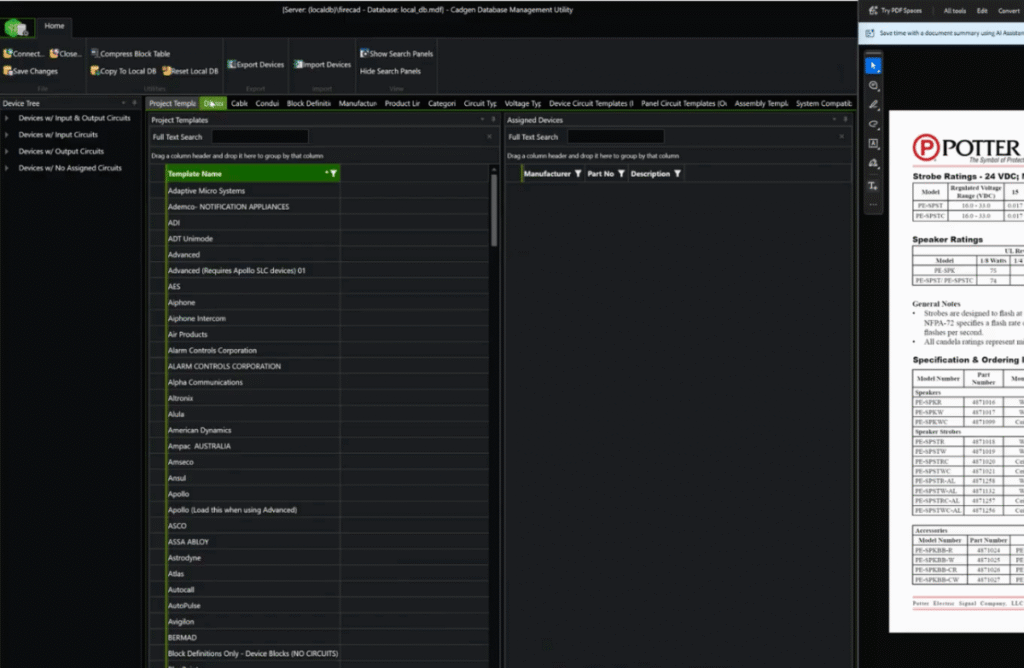
Every part in FireCAD is built directly from the manufacturer’s published data sheet — the same document the AHJ will have open during review. That alignment is deliberate and precise. A single notification appliance might come in multiple candela settings, several mounting positions, different color options, and a different current draw across each combination. FireCAD captures all of it, exactly as it appears on the spec sheet — not the most common configuration, not a representative subset, every published variant.
The result is a drawing that arrives at the AHJ’s desk with nothing to dispute. No typos in device settings. No stale model numbers. No configurations the reviewer can’t find on the sheet.
A resubmittal isn’t just an inconvenient round-trip — it’s a fee, a slot back on the AHJ’s review calendar, and a schedule slip on a project that was otherwise ready to go. Depending on the jurisdiction, it can reset the review clock entirely. A library that matches the AHJ’s reference document is one of the most direct levers a design team has on positively influencing project schedule.
What generic platforms can’t give you
General-purpose CAD tools are built to draw things. They aren’t built to know anything about what you’re drawing. In most, a device symbol is a shape. It carries no data. The candela rating, the mounting configuration, the current draw — those all live somewhere outside the tool, and getting them onto the drawing is a manual process every single time.
That manual step is exactly where specification errors enter. A designer copies a value from a cut sheet. It’s close but not exact, or it was correct when the cut sheet was printed but the manufacturer has since issued a revision. Or the value is technically right but the full configuration wasn’t captured. The drawing goes out, the AHJ checks it against the current data sheet, and it comes back.
FireCAD is purpose-built for fire alarm and low voltage design, which means the parts library isn’t an add-on — it’s foundational to how the tool works. When you place a device, you’re placing a data-complete part: manufacturer, model, configuration, current draw, mounting options — all already consistent with the spec sheet, without any manual transcription.
General-purpose tools make the designer responsible for data accuracy. FireCAD builds that accuracy into the act of placing the device.
Accurate designs produce accurate material lists
The parts library doesn’t just protect submittals — it protects the project budget. When every device on a drawing carries the correct manufacturer, model number, and configuration, the bill of materials that comes out of that drawing is right. Procurement teams are ordering the actual SKUs specified. Estimates reflect what will actually be installed.
In a workflow where designers are manually transcribing part data from cut sheets into a generic CAD tool, small errors compound quickly. A design built on a verified parts library is a design where the spec and the procurement list are telling the same story from the start. That alignment between what was drawn and what gets ordered is one of the cleaner ways to keep a project’s cost picture from drifting between design and installation.
The data holds up at inspection — not just at submittal
The path from design approval to final inspection depends on documentation that stays consistent across every handoff. When the inspector arrives on site, they’re checking what was installed against what was approved. If the as-built drawing carries accurate, spec-sheet-sourced device data, that comparison is clean. If it doesn’t, the inspector flags discrepancies, and the team has to trace them back through the project.
Because FireCAD draws directly from verified manufacturer data, the specifications baked into the drawing at design time are the same ones the AHJ approved, the same ones the devices were ordered and installed to, and the same ones the inspector will verify. The chain holds from first placement through final sign-off.
For firms that also work in Inspect Point, that continuity is even more direct. Device data from the FireCAD design flows into inspection workflows without re-entry, keeping what was designed and what gets recorded in the field in sync.
Service teams can actually rely on the documentation
The value of accurate device data doesn’t end when the project closes out. It compounds every time someone has to work on the system after installation.
Service technicians responding to a deficiency need to know exactly what’s installed — the part number, the configuration, the manufacturer — to diagnose the issue, order the right replacement, or evaluate compatibility with adjacent devices. If the as-built documentation is accurate, that lookup is fast. If it isn’t, the tech is cross-referencing in the field, calling the installing contractor, or guessing.
The same applies to system extensions and renovations. Adding a device to an existing zone, finding a replacement for a discontinued model, or evaluating a system for a building change all depend on knowing what’s currently installed. A drawing built on real spec-sheet data is a document service teams can rely on years after the original installation — not just a submittal artifact that lives in a file folder.
Every designer on your team is working from the same source of truth
In a firm with multiple designers, multiple offices, or multiple projects running in parallel, consistency across documentation is hard to enforce manually. When everyone is sourcing device data from their own cut sheets, their own saved blocks, or their own memory of how a part was specified last time, drawings drift. The same device ends up represented differently across projects. Review and QA become exercises in reconciliation.
Because FireCAD’s library is shared and centrally maintained, every designer on the team is pulling from the same verified data. The notification appliance you place in Chicago has the same configurations, the same current draw, the same spec-sheet accuracy as the one your colleague placed in Phoenix last week. Consistency stops being something a principal has to police and becomes a property of the tool itself.
For firms with quality review processes, that uniformity also makes reviews faster. When documentation is consistent by default, reviewers can focus on design decisions rather than chasing down why the same device is represented three different ways across a package.
New designers ramp faster
A significant amount of knowledge at most fire alarm design firms lives in people’s heads. Senior designers know which candela settings a given sounder-strobe ships in, which configurations are available for a particular pull station, and which product lines have been updated recently. Junior designers either learn that over years, ask someone who knows, or get it wrong and find out at submittal.
A verified parts library changes that equation. When a new designer places a device in FireCAD, the configurations available to them are the configurations that actually exist — drawn directly from the manufacturer’s data sheet. They don’t need to already know the product catalog to specify correctly. The library carries that knowledge for them.
That matters for onboarding timelines, but it also matters for key-person risk. Firms that rely on one or two experienced designers to catch specification errors are one departure away from a problem. When the accuracy is built into the tool rather than carried by individuals, it travels with every project regardless of who’s doing the work.
Less time hunting. More time designing.
FireCAD’s library has more than 18,000 parts today, covering fire alarm and low voltage systems across nearly 200 manufacturers. For most projects, the part you need is already there, with every configuration ready to place.
The everyday version of that value is straightforward: less time cross-referencing cut sheets, less time wondering whether the device you placed last quarter still reflects current specs, less time building parts by hand that should already exist. The library handles the data work so designers can focus on the design.
And the value compounds over time. A designer who’s been working in FireCAD for a year isn’t just benefiting from the library as it stood when they started — they’re working from a library that’s been growing all year, validated against thousands of other projects in the meantime. Every part another customer needed and we added is part of the foundation the next person builds on.
18,000 parts and counting — and growing from real projects
When a customer hits a project that needs a part FireCAD doesn’t have yet, they send it in. Our team builds the entry directly from the manufacturer’s data sheet and it’s typically in your device palette within 24 hours, fully configured and ready to place.
That loop is what’s driven the library to 18,000 parts. The part that gets added next is, by definition, the part a real designer needs on a real project this week — so the library doesn’t drift from what’s actually being specified in the market. It tracks it.
Help us continue to grow our database
If there’s a part you need that you don’t see in your FireCAD device palette yet, email us today or submit your request through the help desk: https://support.cadgen.com/hc/en-us/requests/new (email verification required). Our team will pull the manufacturer’s data sheet and add the part — typically within 24 hours.
Frequently Asked Questions
How is FireCAD’s parts library different from working in general-purpose CAD tools?
General-purpose CAD tools are built to draw shapes — a device symbol on the drawing carries no underlying data. The designer is responsible for sourcing and transcribing every spec from a manufacturer’s cut sheet, every time, which is exactly where most specification errors enter. FireCAD is purpose-built for fire alarm and low voltage design, so when you place a device, you’re placing a data-complete part: manufacturer, model, configuration, and current draw already consistent with the published spec sheet, with no manual transcription required.
What happens if I need a part that isn’t in FireCAD’s library yet?
Submit the part through our help desk and our team builds the entry directly from the manufacturer’s published data sheet. Turnaround is typically within 24 hours, so the request doesn’t stall the project — by the next day, the new device is in your palette, fully configured and ready to place. Every configuration is captured exactly as published, not approximated or simplified to the most common variant.
Why does accurate device data matter beyond the design phase?
The same data that clears AHJ review at submittal carries through the rest of the project. At procurement, accurate part numbers and configurations mean the BOM ordered matches what was specified — no substitutions or change orders from spec drift. At inspection, the as-built matches what was approved. Years later, service technicians responding to a deficiency can rely on the documentation to identify exactly what’s installed, source compatible replacements, or evaluate a system for an extension. The accuracy compounds at every handoff.
Can multiple designers on my team work from the same parts library?
Yes. The library is shared and centrally maintained, so every designer at your firm — across offices and projects — pulls from the same verified source. The notification appliance placed in one office has the same configurations, the same current draw, and the same spec-sheet accuracy as the one placed in another office last week. That consistency eliminates spec drift across projects, makes quality review faster, and means principals don’t have to manually police consistency between team members.

- New Parts Added Daily: How FireCAD Keeps the Database Current - May 18, 2026
- Key Design Takeaways from Inspect Point’s 2026 Fire & Life Safety Industry Report - February 16, 2026
- FireCAD x Inspect Point Integration: Closing the Gap Between Design and Inspection - November 20, 2025